

<SignIn /> component
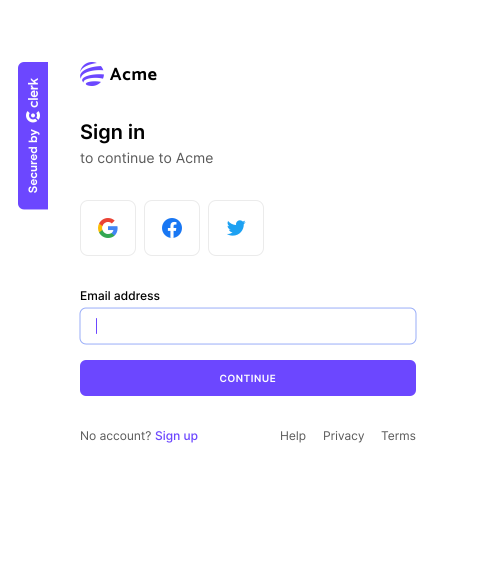
The <SignIn /> component renders a UI for signing in users. The functionality of the <SignIn /> component are controlled by the instance settings you specify in your Clerk Dashboard(opens in a new tab), such as sign-up options and social connections. You can further customize your <SignIn /> component by passing additional properties at the time of rendering.
The following methods available on an instance of the Clerk class are used to render and control the <SignIn /> component:
mountSignIn()
Render the <SignIn /> component to an HTML <div> element.
function mountSignIn(node: HTMLDivElement, props?: SignInProps): void;
mountSignIn() params
| Name | Type | Description |
|---|---|---|
node | HTMLDivElement(opens in a new tab) | The container <div> element used to render in the <SignIn /> component |
props? | SignInProps | The properties to pass to the <SignIn /> component |
mountSignIn() usage
In the example below, the <SignIn /> component is rendered to a <div> element with id="sign-in". The <SignIn /> component will be rendered with the default settings specified in your Clerk Dashboard(opens in a new tab).
index.tsimport Clerk from '@clerk/clerk-js';

// Selects for <div id="app"> and adds a <div id="sign-in"> to it
document.querySelector<HTMLDivElement>('#app')!.innerHTML = `
  <div
    id="sign-in"
  >
  </div>
`;

const signInComponent = document.querySelector<HTMLDivElement>('#sign-in')!;

// Initialize Clerk with your Clerk publishable key
const clerk = new Clerk(`{{pub_key}}`);
await clerk.load();

clerk.mountSignIn(signInComponent, {});
index.html<!-- Add a <div id="sign-in"> element to your HTML -->
<div id="sign-in"></div>

<script>
  // Get this URL and Publishable Key from the Clerk Dashboard
  const clerkPublishableKey = `{{pub_key}}`;
  const frontendApiUrl = 'https://[your-domain].clerk.accounts.dev';
  const version = '@latest'; // Set to appropriate version

  // Creates asynchronous script
  const script = document.createElement('script');
  script.setAttribute('data-clerk-frontend-api', frontendApiUrl);
  script.setAttribute('data-clerk-publishable-key', clerkPublishableKey);
  script.async = true;
  script.src = `${frontendApiUrl}/npm/@clerk/clerk-js${version}/dist/clerk.browser.js`;

  script.addEventListener('load', async function () {
    await window.Clerk.load();

    const signInComponent = document.querySelector('#sign-in');

    window.Clerk.mountSignIn(signInComponent, {});
  });
  document.body.appendChild(script);
</script>
unmountSignIn()
Unmount and run cleanup on an existing <SignIn /> component instance.
function unmountSignIn(node: HTMLDivElement): void;
unmountSignIn() params
| Name | Type | Description |
|---|---|---|
node | HTMLDivElement(opens in a new tab) | The container <div> element with a rendered <SignIn /> component instance |
unmountSignIn() usage
index.tsimport Clerk from '@clerk/clerk-js';

document.querySelector<HTMLDivElement>('#app')!.innerHTML = `
  <div
    id="sign-in"
  ></div>
`

const signInComponent = document.querySelector<HTMLDivElement>('#sign-in')!;

// Initialize Clerk with your Clerk publishable key
const clerk = new Clerk(`{{pub_key}}`);
await clerk.load();

clerk.mountSignIn(signInComponent, {});

// ...

clerk.unmountSignIn(signInComponent, {});
index.html<div id="sign-in"></div>
<script>
  // Get this URL and Publishable Key from the Clerk Dashboard
  const clerkPublishableKey = `{{pub_key}}`;
  const frontendApiUrl = 'https://[your-domain].clerk.accounts.dev';
  const version = '@latest'; // Set to appropriate version

  // Creates asynchronous script
  const script = document.createElement('script');
  script.setAttribute('data-clerk-frontend-api', frontendApiUrl);
  script.setAttribute('data-clerk-publishable-key', clerkPublishableKey);
  script.async = true;
  script.src = `${frontendApiUrl}/npm/@clerk/clerk-js${version}/dist/clerk.browser.js`;

  script.addEventListener('load', async function () {
    await window.Clerk.load();

    const signInComponent = document.querySelector('#sign-in');

    window.Clerk.mountSignIn(signInComponent, {});

    // ...

    window.Clerk.unmountSignIn(signInComponent, {});
  });
  document.body.appendChild(script);
</script>
openSignIn()
Opens the <SignIn /> component as an overlay at the root of your HTML body element.
function openSignIn(props?: SignInProps): void;
openSignIn() params
| Name | Type | Desciption |
|---|---|---|
props? | SignInProps | The properties to pass to the <SignIn /> component |
SignInProps
The type of the props parameter in the openSignIn() method is defined as follows:
| Name | Type | Description |
|---|---|---|
routing | 'hash' | 'path' | 'virtual' | The routing strategy for your pages. Defaults to 'path'. |
path | string | The path where the component is mounted on when path-based routing is used. For example, /sign-inThis prop is ignored in hash- and virtual-based routing. |
redirectUrl | string | Full URL or path to navigate after successful sign in or sign up. The same as setting afterSignInUrl and afterSignUpUrl to the same value. |
afterSignInUrl | string | The full URL or path to navigate after a successful sign in. Defaults to /. |
signUpUrl | string | Full URL or path to the sign up page. Use this property to provide the target of the 'Sign Up' link that's rendered. |
afterSignUpUrl | string | The full URL or path to navigate after a successful sign up. Defaults to /. |
initialValues | SignInInitialValues | The values used to prefill the sign-in fields with. |
openSignIn() usage
index.tsimport Clerk from '@clerk/clerk-js';

// Initialize Clerk with your Clerk publishable key
const clerk = new Clerk(`{{pub_key}}`);
await clerk.load();

clerk.openSignIn();
index.html<script>
  // Get this URL and Publishable Key from the Clerk Dashboard
  const clerkPublishableKey = `{{pub_key}}`;
  const frontendApiUrl = 'https://[your-domain].clerk.accounts.dev';
  const version = '@latest'; // Set to appropriate version

  // Creates asynchronous script
  const script = document.createElement('script');
  script.setAttribute('data-clerk-frontend-api', frontendApiUrl);
  script.setAttribute('data-clerk-publishable-key', clerkPublishableKey);
  script.async = true;
  script.src = `${frontendApiUrl}/npm/@clerk/clerk-js${version}/dist/clerk.browser.js`;

  script.addEventListener('load', async function () {
    await window.Clerk.load();

    window.Clerk.openSignIn();
  });
  document.body.appendChild(script);
</script>
closeSignIn()
Closes the sign in overlay.
function closeSignIn(): void;
closeSignIn() usage
index.tsimport Clerk from '@clerk/clerk-js';
import { dark } from "@clerk/themes";

// Initialize Clerk with your Clerk publishable key
const clerk = new Clerk('{{pub_key}}');
await clerk.load();

clerk.openSignIn();

// ...

clerk.closeSignIn();
index.html<script>
  // Get your Publishable Key and Frontend API URL from the Clerk Dashboard
  const clerkPublishableKey = '{{pub_key}}';
  const frontendApiUrl = 'https://[your-domain].clerk.accounts.dev';
  const version = '@latest'; // Set to appropriate version

  // Creates asynchronous script
  const script = document.createElement('script');
  script.setAttribute('data-clerk-frontend-api', frontendApiUrl);
  script.setAttribute('data-clerk-publishable-key', clerkPublishableKey);
  script.async = true;
  script.src = `${frontendApiUrl}/npm/@clerk/clerk-js${version}/dist/clerk.browser.js`;

  script.addEventListener('load', async function () {
    await window.Clerk.load();

    window.Clerk.openSignIn();

    // ...

    window.Clerk.closeSignIn();
  });
  document.body.appendChild(script);
</script>